
With default configurations, JBoss listens on port 8080 for web connections. But this can be changed easily as this port is defined in an configuration xml file.
This is how port 8080 is changed on JBoss 4.
1. Goto the deploy folder of the server instance you use.
2. Goto the jbossweb-tomcat55.sar inside that deploy folder.
3. Find the file named server.xml inside that folder. (tomcat service file).
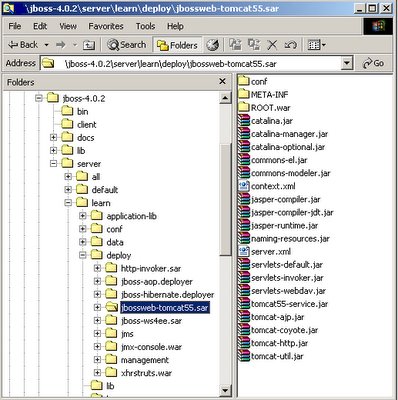
Look for the HTTP Connector section inside the server.xml where 8080 configuration is available. Change the port value to what ever the required port number.
This change wiill be available when JBoss is restarted.
Related: Change port in Tomcat?
This is how port 8080 is changed on JBoss 4.
1. Goto the deploy folder of the server instance you use.
2. Goto the jbossweb-tomcat55.sar inside that deploy folder.
3. Find the file named server.xml inside that folder. (tomcat service file).

Look for the HTTP Connector section inside the server.xml where 8080 configuration is available. Change the port value to what ever the required port number.
This change wiill be available when JBoss is restarted.
Related: Change port in Tomcat?
Kamal Mettananada is a software engineer, Java explorer & author of Digizol, blog with computer related articles, tutorials, tips and many other information.
19 Comments for "[JBoss 4] How to change port 8080 in JBoss?"
Thank you,
My Friend
I've just downloaded Jboss-4.2.2 GA and it doesn't have this.
Yet it's failing to start because I have another app server that's already using that port (8080).
So how do I make a mod?
Cheers
g fait l'intégration de JBPM sous éclipse, et le déploiement se fait sous tomcat.
si quelqu'un peut me donner code java pour:
-récupérer la liste des scénarios workflow
-déclenchement d'un scénario
-passage d'un état au suivant
merci
I was doing this with 4.0 and did not have a time to check with 4.2 yet.
One more point to add to your's:
Suppose port is changed to 8090.
To check whether JBoss is working at the changed port - 8090:
Open a browser.
Type in http://localhost:8090
You should get the JBoss home page.
Happy Jbossing-
Thalapathy.
It solved my problem that i had been looking for days.
And that too in very simple steps and most important VERY CLEARLY :)
Thanks Again...
for long Time !
Thank you very very Much